

Hi, I’m Ifytext Chibuzor. I'm an electrician. I have spent over 4 years working with prepaid meters, solar setups, and inverters. I started PowerPek to share real-life solutions to the everyday power issues many of us face with our prepaid meters — from token errors to meter tampering warnings and many others.
Hi, I’m Ifytext Chibuzor. I'm an electrician. I have spent over 4 years working with prepaid meters, solar setups, and inverters. I started PowerPek to share real-life solutions to the everyday power issues many of us face with our prepaid meters — from token errors to meter tampering warnings and many others.
WZPDCL, or West Zone Power Distribution Company Limited (WZPDCL), is a government-owned company responsible for distributing electricity in the western zone of Bangladesh (i.e., Khulna Division, Barisal Division and Greater Faridpur region, comprising 21 districts and 20 upazilas excluding the REB area). WZPDCL distributes prepaid meters to customers to enable them to manage their electricity consumption.
A WZPDCL prepaid meter is an electricity meter that is used in monitoring and managing electricity consumption, which allows consumers to pay for their electricity usage in advance.
This prepaid meter allows users to have full control of their energy usage by allowing them to monitor their electricity consumption in real-time. The WZPDCL prepaid meter works on the pay-as-you-go model, allowing consumers to pay for their energy consumption even before use.
🚀 Join Our Crypto Airdrop Channel! 💰
Stay updated on the latest free airdrops and earn free crypto effortlessly. Don’t miss out!
🔗 Join Now on TelegramHowever, to use this prepaid meter, you’ll need to recharge your meter with a prepaid electricity credit token. You will need to load this token into your meter whenever your credit balance is low. This is vital because once your credit balance reaches zero, your power supply will be interrupted until your next recharge.
Read also: BPDB prepaid meter
WZPDCL Prepaid Meter
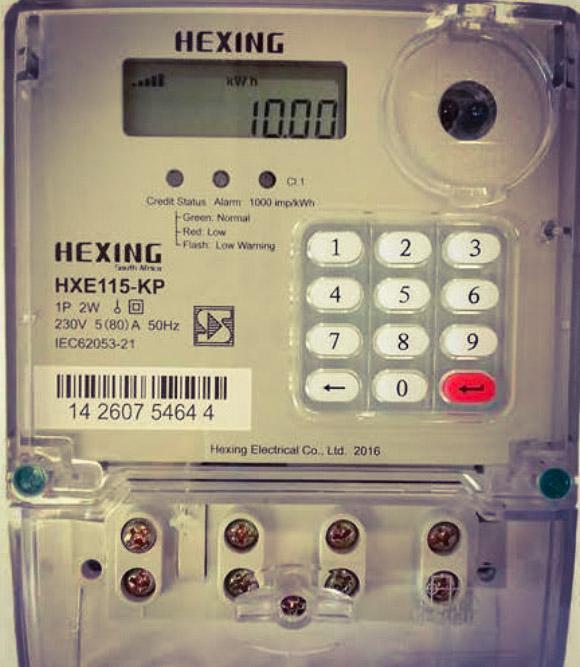
The WZPDCL prepaid meter is a modern electricity metering system that is used to measure and track electricity consumption. It allows consumers to monitor their usage in real-time and pay for their electricity usage in advance.
With this meter, electricity consumers can manage their energy more efficiently since they have insight into their usage patterns; hence, they are able to detect high-energy-consuming appliances and reduce their usage to reduce costs.
WZPDCL prepaid meters are highly digitalized and automated; hence, the meter can disconnect automatically when the credit balance is low and reconnect automatically once you top up. So, in order to avoid a power outage, it is best for you to recharge your meter when the balance is low.
Features of WZPDCL Prepaid Meters
The features of WZPDCL prepaid meters are listed below:
- Near-real-time monitoring of energy consumption
- Automatic disconnection and reconnection
- Integration with smart grids
- Seamless top-up options
- Advanced sensors to protect the meter from unauthorized access.
How WZPDCL Prepaid Meter Works
The WZPDCL prepaid meter works on the general model of pay-as-you-go. However, the general process is listed below:
1. Purchase, Installation, and Activation
- Buy the prepaid meter
- Wait for installation
- Setup and activation
2. Purchase Recharge Token
- Buy prepaid electricity credit tokens from vendors
- Receive your token
3. Load the Credit Token
- Locate your WZPDCL prepaid meter CIU
- Connect it to a power source
- Enter the 20-digit tokens and your credit balance will be updated
4. Usage
- Start using your prepaid
- Monitor your consumption effectively and adjust your usage pattern when necessary
- Top up your credit units again when your balance is low.
WZPDCL Prepaid Meter Online
One of the ways that you can apply for a WZPDCL prepaid meter is online. It is simple and straightforward; follow the steps below to apply:
1. Start Application
- Visit online application
2. Complete the application form
- Fill out your personal details, like full name, National ID, gender, date of birth, etc.
- Upload needed document, such as your photo, signature, etc.
- Solve the chaptcha
- Click on the save and continue tab.
- Complete the mailing addres, such as your residential address, postal code, etc.
- Upload documents if required; otherwise, click on the save and continue button to proceed to the next stage
- Fill out the connection address page
- Write your home address, including your build and plot number for easy identification.
- Complete the description page by entering the necessary details.
3. Pay for the Meter
- Pay for your meter using any of the methods they provide.
- If the payment is successful and your application is approved, they will schedule an inspection visit to your property.
4. Site Inspection and Installation
- A technician from WZPDCL will inspect your property
- After inspection, installation follows
- Once the meter is installed, it will be activated and ready for use.
Conclusion
The WZPDCL prepaid meter is used to manage energy consumption in the western zone of Bangladesh. The meter works on the principle of pay-as-you-go, allowing users to pay for their energy usage in advance. The meter has some features that enable electricity consumers to have full control of their energy usage, leading to efficient energy management. If you reside in Western Bangladesh and you use electricity, it won’t be a bad idea if you get the WZPDCL prepaid meter for your property to help you manage your electricity consumption more efficiently.


Hi, I’m Ifytext Chibuzor. I'm an electrician. I have spent over 4 years working with prepaid meters, solar setups, and inverters. I started PowerPek to share real-life solutions to the everyday power issues many of us face with our prepaid meters — from token errors to meter tampering warnings and many others.
 JOIN OUR TELEGRAM CHANNEL
  JOIN OUR WHATSAPP CHANNEL


