

Hi, I’m Ifytext Chibuzor. I'm an electrician. I have spent over 4 years working with prepaid meters, solar setups, and inverters. I started PowerPek to share real-life solutions to the everyday power issues many of us face with our prepaid meters — from token errors to meter tampering warnings and many others.
Hi, I’m Ifytext Chibuzor. I'm an electrician. I have spent over 4 years working with prepaid meters, solar setups, and inverters. I started PowerPek to share real-life solutions to the everyday power issues many of us face with our prepaid meters — from token errors to meter tampering warnings and many others.
As a DESCO prepaid meter user, it is important for you to check your meter regularly to ensure its optimal performance. This is an overall check of your prepaid meter, which may involve checking the remaining balance of your credit unit, your current consumption status, recharge history, and total electricity credit units that you’ve used.
A DESCO prepaid meter check is not all that difficult since there are different ways that you can use to view your energy consumption history. You can decide to check it through their official portal, your meter screen display, mobile apps, or by contacting their customer care that covers your region.
Interestingly, whether you want to see your credit balance, recharge history, consumption status, etc. on your DESCO prepaid meter, the process is very similar, irrespective of the method you opt for. So, if you decide to check your prepaid meter, you may not have trouble doing that since there are different options available through which you can do that.
🚀 Join Our Crypto Airdrop Channel! 💰
Stay updated on the latest free airdrops and earn free crypto effortlessly. Don’t miss out!
🔗 Join Now on TelegramAs an electricity consumer who uses a DESCO prepaid meter to manage your energy consumption, it makes sense to check your meter regularly to enable you to prevent power outages due to low balance, detect hidden errors, gain insight into your consumption pattern, and adjust accordingly, among other numerous benefits. Once you check your meter regularly, you’ll be able to reduce maintenance costs because you’ll be able to detect issues early and resolve them before they get worse.
Read also: DESCO prepaid meter helpline
Why DESCO Prepaid Meter Check

Some of the reasons why you should check your DESCO prepaid meter are outlined below:
- To prevent power outages due to insufficient credit balances.
- To enable you to manage your energy consumption more efficiently.
- To detect errors early and fix them to reduce maintenance costs.
- To enable you to make proper budgetary allocations for your energy expenses.
- To gain direct insight into your consumption pattern.
How to Check Your DESCO Prepaid Meter
At this point, I know that you’ve known the essence of checking your prepaid meter regularly; let’s quickly look at the measures through which you can achieve that.
As we noted in the introduction, there are different ways through which you can check your prepaid meter, starting from using their online portal, meter display screen, or mobile app to contacting the DESCO division nearest to you. For the sake of clarity, let’s look at them one after the other.
1. Prepaid Meter Display Screen
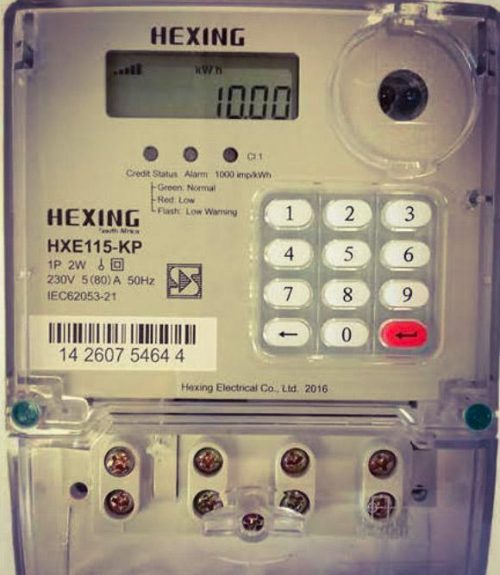
One of the most common methods that you can use to check your meter is through its display screen. If you’ve noticed before, you’d agree with me that most DESCO prepaid meters have screens that display different functions. To use this method, do this:
- Visit your prepaid meter stand
- Check for a button on it
- Click on the button, and your meter will display different functions such as the total credit units you’ve used, your current consumption status, credit balance, etc.
2. DESCO Mobile App
You can also check your prepaid meter through their dedicated mobile apps. They have apps for both iOS and Android users; hence, you will be able to check your DESCO effortlessly, irrespective of the type of device you’re using. Kindly follow the steps below to use this method to check your prepaid meter:
- Download the DESCO prepaid meter app from play.google.com or apps.apple.com, depending on your device.
- Sign up for an account if you’re a new user or log in with your details if you already have an account.
- Go to the history section of your app, click on it, and you’ll be able to see your transactions on a platter of gold.
3. DESCO’s Online Portal
On the DESCO official website, you can also check your prepaid meter by simply following the lay-down instructions below:
- Visit DESCO website
- Sign in with your account number or meter number
- Once you access your dashboard, look for your transaction history section within the site, click on it, and you’ll be able to check any function of your meter.
4. DESCO Office
Since Dhaka Electric Supply Company Limited has over 24 different divisions scattered all over the city, you can also decide to check your prepaid meter by visiting any of those divisions closest to you. These outlets are always open to attend to customer issues, so you can check in and rest assured that they will help you check your prepaid meter.
FAQs
How do I check my DESCO prepaid meter details?
You can check your DESCO prepaid meter details through different methods, like using their online portal, mobile app, visiting DESCO office branches, etc.
How to check usage on a DESCO prepaid meter?
You can check your DESCO prepaid meter usage details through its CIU. With the UIU, you will be able to see the remaining credit balance on your meter.
What is the history of Desco?
The Bangladeshi Companies Act 1994 birthed DESCO, which started operation in November 1996. Currently, DESCO serves over 7 million people with electricity. Since its inception, they have bought about 14% of the national power supply.
Conclusion
If you want to check your DESCO prepaid meter history, credit balance, current consumption status, etc., you can do that through a variety of methods, ranging from using the meter display screen, mobile apps, an online platform, to visiting any DESCO physical office in person. These methods are effective and quite simple to use. You can use any of them that is more convenient for you and you’ll be happy that you did.


Hi, I’m Ifytext Chibuzor. I'm an electrician. I have spent over 4 years working with prepaid meters, solar setups, and inverters. I started PowerPek to share real-life solutions to the everyday power issues many of us face with our prepaid meters — from token errors to meter tampering warnings and many others.
 JOIN OUR TELEGRAM CHANNEL
  JOIN OUR WHATSAPP CHANNEL


