

Hi, I’m Ifytext Chibuzor. I'm an electrician. I have spent over 4 years working with prepaid meters, solar setups, and inverters. I started PowerPek to share real-life solutions to the everyday power issues many of us face with our prepaid meters — from token errors to meter tampering warnings and many others.
Hi, I’m Ifytext Chibuzor. I'm an electrician. I have spent over 4 years working with prepaid meters, solar setups, and inverters. I started PowerPek to share real-life solutions to the everyday power issues many of us face with our prepaid meters — from token errors to meter tampering warnings and many others.
Experiencing error 31 on your Landis+Gyr prepaid meter can be frustrating, especially when you rely on it for accurate energy consumption recordings and efficient power management. So it is important to fix it should it occur.
The error 31 code indicates that the Landis+Gyr meter has been placed in idle mode, which in turn causes a disruption in DNP (Do Not Process) communications.
Once there is Error 31 on your meter, the DNP communication will stop, which will affect the meter’s data recording and transmission accuracy. When this disruption occurs, your Landis+Gyr meter won’t function properly, leading to discrepancies in recording energy usage data.
🚀 Join Our Crypto Airdrop Channel! 💰
Stay updated on the latest free airdrops and earn free crypto effortlessly. Don’t miss out!
🔗 Join Now on TelegramLandis+Gyr error 31 fix is pretty easy, and it doesn’t take time to get it resolved as long as you get the solution right. In this guide, we’ll x-ray the Landis+Gyr error 31, its meaning, implication, causes, and, of course, measures on how to fix it. Let’s get started!
What is Error Code 31?
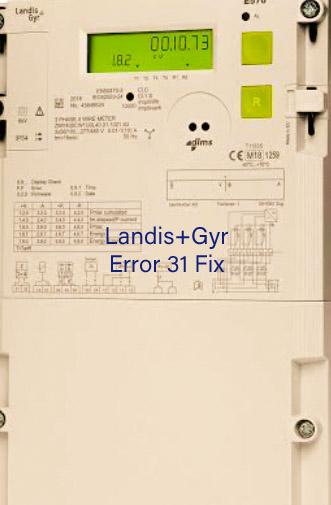
Error Code 31 is displayed on a Landis+Gyr prepaid meter when the protocol converter card detects that the meter has been placed in idle mode.
This idle mode prevents the meter from processing new commands, hence leading to a temporary halt in DNP communications, which effects the overall function of the meter.
This error 31 When it occurs, it may cause the meter to start malfunctioning. In some instances, the meter may not be able to track energy consumption correctly, leading to either overbilling or underbilling, which will be detrimental to the electricity consumer and utility provider, respectively. It is important for you to get it fixed on time to avoid stories that touch the heart.
Implications Error 31 on Landis+Gyr Meter
The effect of Error 31 on the Landis+Gyr meter is that the protocol converter card reboots and the DNP communications are stopped as well. When these happen, the data analytic feature of the meter will be affected, resulting in inconsistency in recording energy consumption, which will either affect the user (overbilling) or the utility provider (underbilling). So the error 31 has a negative impact on the Landis+Gyr meter.
Causes of Error 31 on Landis+Gyr Meter
Although the primary cause of Error 31 on a Landis+Gyr meter is when the meter is placed in idle mode due to reasons like scheduled maintenance, system errors, configuration changes, etc.,. There are other factors that can also cause Landis+Gyr error 31, like network issues, firmware problems, etc.
Landis+Gyr Error 31 Fix
There are a number of ways that you can fix Landis+Gyr error 31. They are listed below:
1. Reset your Landis+Gyr Meter
- Press and hold the reset button on the meter for a few seconds.
- Wait for a moment for the meter to reboot and re-establish DNP communications.
- Now, check if error 31 is gone after the reset; if it persists, try the second method.
2. Update your Landis+Gyr Meter Firmware
- Visit the Landis+Gyr official website to check if there are new firmware updates.
- If any, download and install the latest firmware version for your meter model.
- Now, succinctly, follow the update instructions provided by Landis+Gyr to ensure a smooth and successful update.
3. Reconfigure your Landis+Gyr Meter Settings
- Access the meter’s settings menu through the display or a connected device.
- Re-enter the correct configuration parameters according to the user manual.
- Now, save the changes and restart the meter to allow the meter to update the new settings automatically.
4. Contact Customer Support
If Error 31 persists on your Landis+Gyr meter after trying the above steps, then you will need to contact the Landis+Gyr support unit or your utility provider for assistance.
FAQs
How do I clear an error on my Landis GYR prepaid meter?
You can clear an error on your Landis GYR prepaid meter by resetting it. You can reset your meter by clicking on the reset button in the meter’s customer interface unit.
How to fix error 31 on a Landis GYR prepaid meter?
You can fix error 31 on your Landis GYR prepaid meter by resetting it, updating its firmware, reconfiguring it, or contacting your electricity provider.
Conclusion
The error 31 on the Landis+Gyr meter indicates that the meter is in idle mode, which stops the DNP communication, which in turn affects the meter’s data recording capacity. The error 31 can be fixed by resetting the meter, updating its firmware, and reconfiguring the meter. However, if none of these measures fix the issue, you can reach out to your utility provider for assistance.


Hi, I’m Ifytext Chibuzor. I'm an electrician. I have spent over 4 years working with prepaid meters, solar setups, and inverters. I started PowerPek to share real-life solutions to the everyday power issues many of us face with our prepaid meters — from token errors to meter tampering warnings and many others.
 JOIN OUR TELEGRAM CHANNEL
  JOIN OUR WHATSAPP CHANNEL


