Posted in: Usage and Management

How to Check Your Prepaid Meter Number: Easiest Way!

In today’s guide, we shall be answering this question: ‘’How to check your prepaid meter number?’’ Stay tuned as we go through it together As a prepaid meter user, it is important for you to know your prepaid meter number because you will definitely need it whenever you want to recharge your meter or carry […]

Posted in: Usage and Management

BSES Prepaid Meter Recharge (Online & App)

Recharging your prepaid meter is very important to keep your utility supply active. Hence, as a BSES prepaid meter user, it makes sense for you to know how to top up your meter with a credit unit whenever it goes low.  In this article, we’re going to discuss BSES prepaid meter recharge, focusing on the […]

Posted in: Usage and Management

DESCO Prepaid Meter Helpline Number: Hotline

Perhaps you use a DESCO prepaid meter for your electricity billing and management but don’t know their helpline. No worries; we’ve got you covered. Just chill and relax as I enlighten you on how to get the number. DESCO prepaid meter helpline number is a phone or mobile number that electricity consumers can use to […]

Posted in: Usage and Management

BSES Prepaid Meter Balance Check (App, Online & Code)

As a BSES prepaid meter user, it won’t be a bad idea if you know how to check your meter balance. However, if you don’t know how to go about it, no worries; we’re here for you. BSES prepaid meter balance check is a straightforward thing that anyone can do and there are different simplified […]

Posted in: Usage and Management

How to Avoid Token Problems on your Prepaid Meter (5 Ways)

It is always annoying and frustrating when you buy electricity tokens but don’t get them, especially when you want to recharge your meter for immediate use. There are many reasons why you may not get your token after purchasing it, ranging from entering the wrong meter number, having network issues, or inputting the wrong user […]

Posted in: Usage and Management

5 Things you Need to do When you Get an Invalid Meter Response

We know how annoying and frustrating it could be when you want to use your prepaid meter to perform a certain function but you get invalid meter response. This is usually annoying? Right! Well, you’re not the only one, as many electricity consumers are in the same shoe as you. So, if you find yourself […]

Posted in: Usage and Management

Eskom Prepaid Meter Software Upgrade

Eskom, the leading electricity supplier in South Africa, has been upgrading its prepaid meter software to enhance the efficiency of their power distribution, billing system, and overall customer experience. As you may have known, Eskom is responsible for the generation, transmission, and distribution of the majority of electricity in South Africa. If you are using […]

Posted in: Usage and Management

eThekwini Electricity Prepaid Meters Contact Number: Phone, Email, etc.

As an eThekwini electricity prepaid meter user, it makes sense to have their contact number so that you will be able to contact them when there is a need for that. Electricity prepaid meters, like other electronic devices, are not devoid of tears and wear, so as a user of eThekwini electricity prepaid meters, it […]

Posted in: Usage and Management

How to Clear Tamper Mode on Prepaid Meter: Fastest Way

We know how frustrating it can be when your prepaid meter enters tamper mode, especially when you have sufficient credit. So, we designed this comprehensive article to guide you on how to clear tamper mode on your prepaid meter should you encounter it.  While prepaid meter tamper mode can be triggered due to unauthorized access, […]

Posted in: Usage and Management

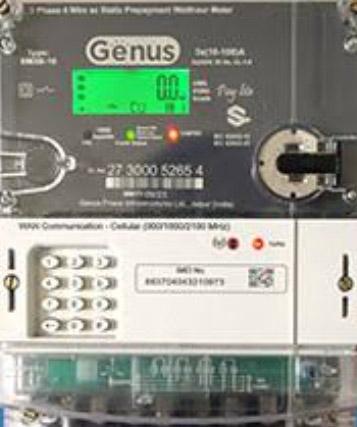
Genus Prepaid Meter Recharge (Online, App & Recharge Outlets)

As a user of a Genus prepaid meter, it is important for you to know how to recharge your meter so that you’ll be able to top up your electricity credit unit when your balance is low. As we all know, once your credit balance runs out, your power supply will be interrupted; hence, it […]

Back to Top
error

Did this post help? Please share this post